

How to Claim Your Service Listing on GoGetParty
Published on 31 July 2026 · by Go Get Party Team
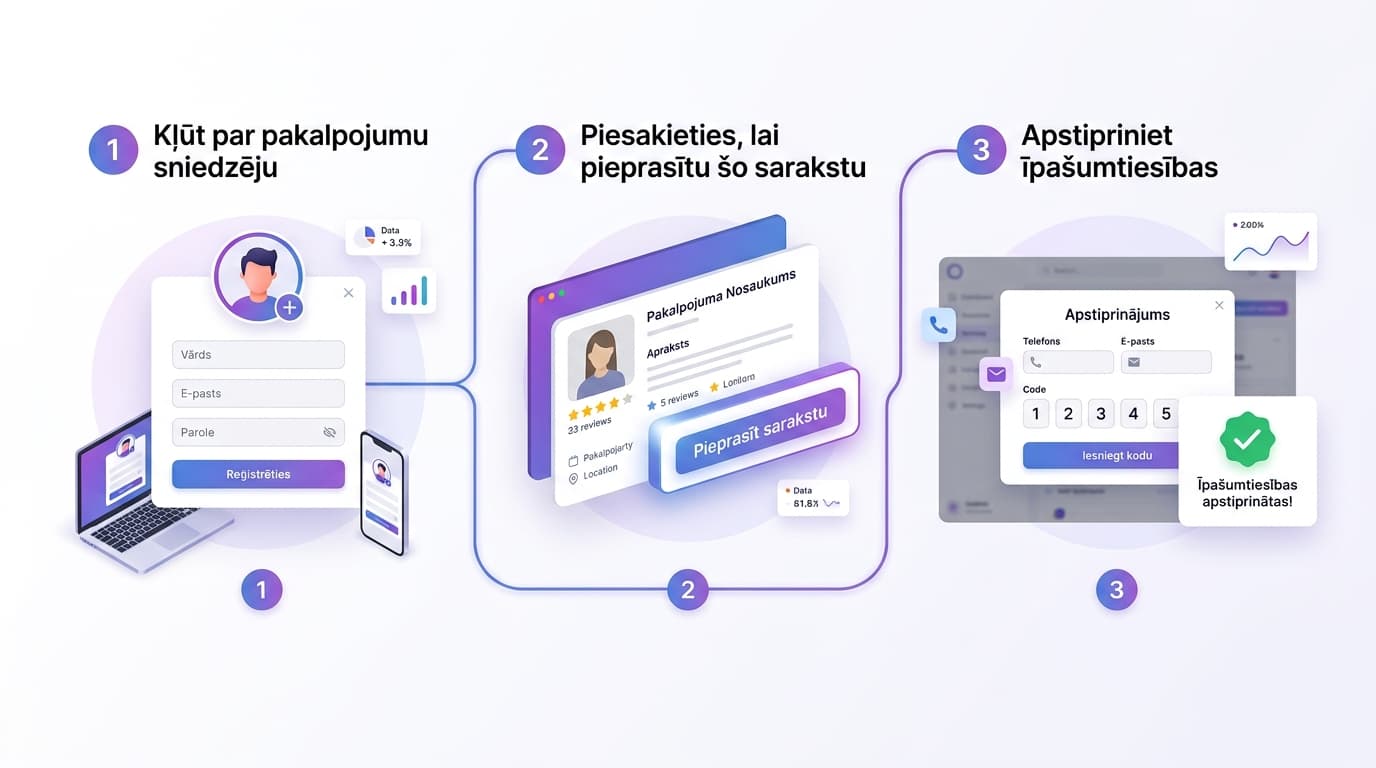
If your business is already published on GoGetParty, follow this guide to register as a service provider and claim ownership of your listing in just a few minutes.
How to Claim Your Service Listing on GoGetParty
Has your business already been published on GoGetParty?
Great! The next step is to claim ownership of your listing so you can edit information, upload photos, update prices, and receive customer inquiries directly.
Step 1. Register as a Service Provider
Before claiming your listing, create a Service Provider account.
Click:
Become Service Provider
After registration, log in to your account.
Step 2. Open Your Listing
Find your published service on GoGetParty.
Click the button:
Claim this Listing
Step 3. Verify Ownership
A verification window will appear.
Choose how you'd like to receive your verification code:
Send code by phone
Send code by email
A 6-digit verification code will be sent to your registered contact information.
Enter the code to continue.
Need Manual Assistance?
If you no longer have access to your phone number or email address, you can request help from our support team.
Click:
Contact Support
Our team will review your request and attach the listing to your account.
You're Done
Once verification is complete, the listing becomes yours.
You can manage it anytime from your profile in the top-right corner.
There you can:
Edit descriptions
Upload photos
Change prices
Receive customer requests
Keep your business information up to date